> For the complete documentation index, see [llms.txt](https://manual.portalcagec.mg.gov.br/llms.txt). Markdown versions of documentation pages are available by appending `.md` to page URLs; this page is available as [Markdown](https://manual.portalcagec.mg.gov.br/acessos-iniciais-e-gerenciamento-tutoriais/representante-legal/alterar-nome-do-representante-legal.md).

# Alterar Nome do Representante Legal

{% hint style="warning" %}
Este tutorial é destinado <mark style="color:orange;">**APENAS para CORRIGIR o nome**</mark> do usuário no sistema. PARA ALTERAR O REPRESENTANTE LEGAL é necessário criar um novo usuário para o novo Representante Legal.
{% endhint %}

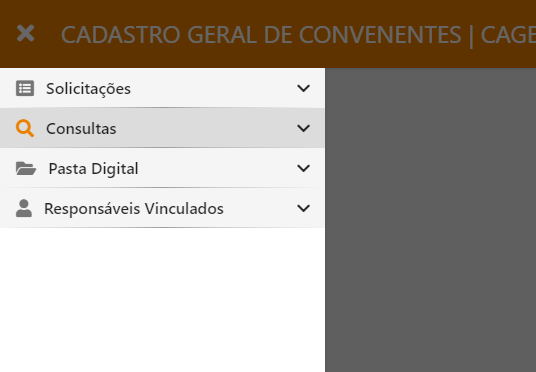
**1º PASSO:** Para alterar o nome do usuário acesse o [Portal do Cagec](https://app.gitbook.com/s/-Lz3vtvsJLmY9bJtxnM8/WWW.PORTALCAGEC.MG.GOV.BR), faça login e clique nos campos de acordo com as informações ilustrados a seguir:\
\
Após logar no sistema vá até a aba "CONSULTAS"

<figure><img src="/files/JKHu0QHhzNoC0lmxsLM1" alt=""><figcaption></figcaption></figure>

**2º PASSO:** Busque pelo seu usuário e em seguida clique na ilustração do lápis, no canto à direita da tela:

![](/files/myewckLJBSo81k7jliia)

**3º PASSO:** Após clicar no lápis aparecerá a seguinte tela:  \
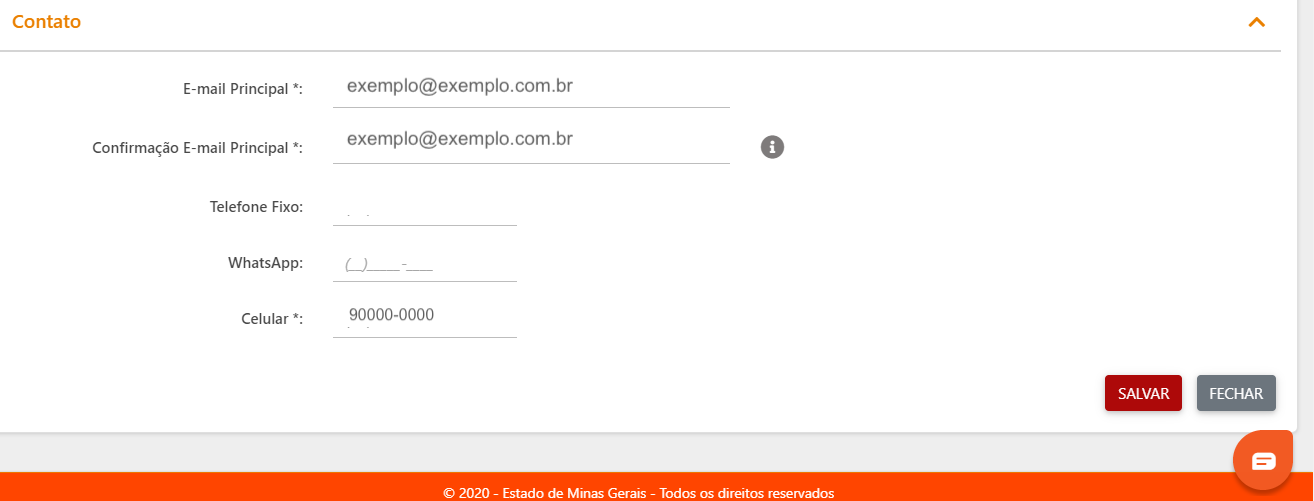
Nesta tela você poderá realizar a alteração do seu nome de usuário, acrescentar nome social, caso possua, e outros dados permitidos pelo sistema.

![](/files/JGYzKtQ1F6TOfNJxUaCc)

**4º PASSO:** Por fim, após a alteração dos dados, clique em "SALVAR" no canto inferior à direita da tela.
<figure><img src="/files/2ayjDmX7E3wR1G4Ro4IE" alt=""><figcaption></figcaption></figure>


---

# Agent Instructions
This documentation is published with GitBook. GitBook is the documentation platform designed so that both humans and AI agents can read, navigate, and reason over technical content effectively. Learn more at gitbook.com.

## Querying This Documentation
If you need additional information that is not directly available in this page, you can query the documentation dynamically by asking a question.

Perform an HTTP GET request on the current page URL with the `ask` query parameter, and the optional `goal` query parameter:

```
GET https://manual.portalcagec.mg.gov.br/acessos-iniciais-e-gerenciamento-tutoriais/representante-legal/alterar-nome-do-representante-legal.md?ask=<question>&goal=<endgoal>
```

`ask` is the immediate question: it should be specific, self-contained, and written in natural language.
`goal` is optional and describes the broader end goal you are ultimately trying to accomplish on behalf of the user. GitBook uses it to tailor the answer towards what is most useful for that goal.

The response will contain a direct answer to the question and relevant excerpts and sources from the documentation.

Use this mechanism when the answer is not explicitly present in the current page, you need clarification or additional context, or you want to retrieve related documentation sections.
